Platform Patterns
Notification Framework
From notification chaos to a coherent system for communicating with users across severity levels and contexts
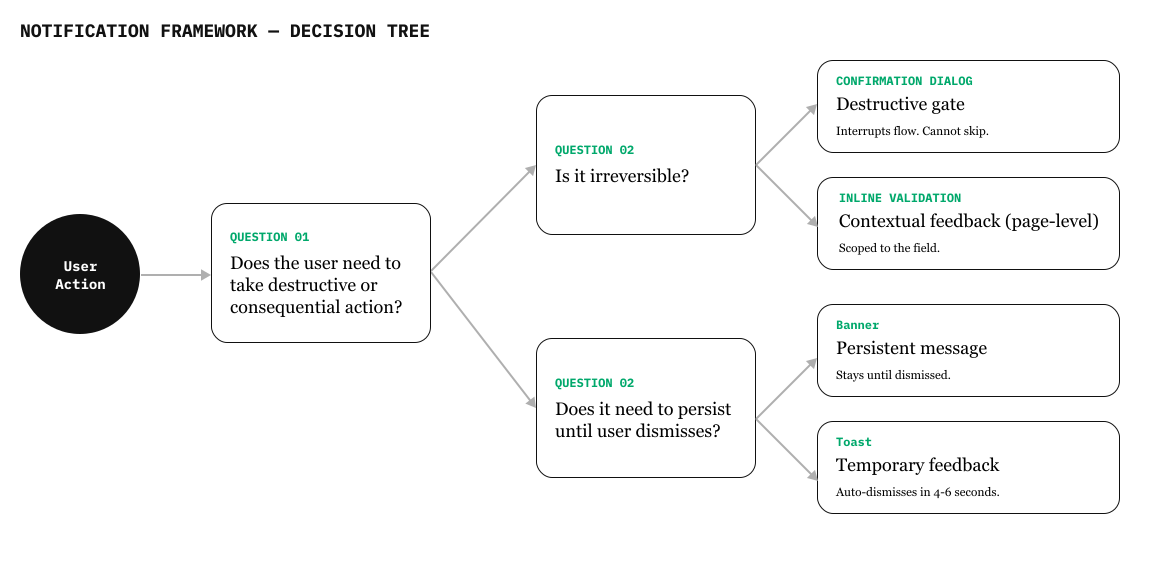
Click to enlarge
The Problem
Notification overload, no coherence
Dayforce had notifications everywhere. Success messages. Error alerts. System updates. Warnings. Confirmations. Every team implemented their own, creating a cacophony of competing attention-grabbers. We had components—toasts, banners—but no framework for when to use what.
The result: users were trained to ignore notifications entirely. Critical errors competed with low-priority confirmations. Support tickets flooded in about "missing" alerts that were actually dismissed because they looked the same as everything else.
Discovery
Auditing the notification landscape
Before proposing any solution, I conducted a full audit across 12 product surfaces — cataloging every notification type, its trigger, its visual treatment, and how users responded. I also analyzed 6 months of support ticket data to understand where notifications were failing.
14
Different notification implementations across 12 product surfaces
73%
Of notification tickets were "I didn't see the error" — critical alerts dismissed because they looked like success toasts
0
Teams had a framework for choosing notification types — every decision was aesthetic, not functional
The Framework
Persistence × Severity
Notification type shouldn't be a component choice — it's determined by two axes: how severe is this? and how long does the user need to see it?
Solution
A coherent notification framework
The core insight: notification type should be determined by persistence + severity, not by which component a team happened to use. I built a decision framework first, then mapped it to components.
Toast
Temporary feedback
Auto-dismisses after 4–6 seconds. For confirmations and low-severity updates.
Use when: action confirmed, no follow-up needed
Banner
Persistent messaging
Stays visible until dismissed. For warnings, errors, and system-level updates.
Use when: user must acknowledge before proceeding
Inline Validation
Contextual feedback
Attached to the field or element that needs attention. For form errors, field-level warnings.
Use when: error is scoped to a specific input
Confirmation Dialog
Destructive action gate
Interrupts the flow intentionally. For irreversible or high-consequence actions only.
Use when: action cannot be undone
Deep Dive
Bulk operations — the hardest problem
When a user selects 200 records and clicks "Archive," what happens? The old behavior: 200 individual toasts, or one "Done" with no detail. The framework needed to handle four distinct outcomes — each with different notification types and accessibility requirements.
Key principle
Bulk operations get one notification, not many. The type escalates with severity — full success auto-dismisses, partial success persists with action, failure persists with retry, destructive actions gate with a dialog.
Tradeoffs
The debates that shaped the framework
Why 4 seconds for toast?
Tested 2s, 4s, 6s, 8s. 2s too fast to read. 6s+ caused toast stacking on rapid actions. 4s was the minimum where 90% of users could read without piling up.
Why not color alone for severity?
Color is reinforcement, not signal. The primary differentiator is behavior — does it disappear or stay? This makes the system work for colorblind users too.
Banner stacking limit
Max 3 visible banners, most severe on top. After 3, oldest collapses into "2 more notifications" link. Prevents banner blindness.
Async operations
Long-running operations show toast "Export started," then persistent banner on completion — even if the user navigated away. The notification finds them.
Adoption
Getting 32 teams to use one framework
A framework nobody uses is just a document. Adoption required three things working together.
01
Decision tree, not a component list
Instead of documenting components, I gave teams a flowchart: "Is the action destructive? → Dialog. Can it auto-resolve? → Toast." Teams could make the right choice in 30 seconds without reading documentation.
02
Baked into the design system
The notification components in the Everest system enforced the framework. You couldn't create an auto-dismissing error banner — the component API wouldn't let you. Correct behavior was the default, not an option.
03
Migration with proof
I partnered with two high-traffic teams (Payroll and Benefits) to migrate first, then shared before/after support ticket data. When other teams saw a 85% reduction in notification-related tickets, adoption became pull instead of push.
Token Architecture
Severity encoded in tokens
Notification colors aren't arbitrary—they're semantic tokens that encode meaning. feedback.error, feedback.warning, feedback.success map consistently across all four notification types and all product surfaces.
Impact
From chaos to coherence
85%
Reduction in notification-related support tickets
4
Clear patterns instead of ad-hoc solutions
Before
Teams choosing notification types based on aesthetics. Users ignoring alerts. Support overwhelmed by "I didn't see the error" tickets.
After
A shared decision framework. Notifications that feel different because they are different. Users that trust the system to tell them what matters.
Reflection
What I learned
The framework mattered more than the components. We already had toasts and banners — what we lacked was a shared mental model for when to use which. Persistence × severity gave teams a decision in 30 seconds without reading docs.
Baking the rules into the component API was the highest-leverage decision. Documentation gets ignored. But when the component won't let you create an auto-dismissing error, correct behavior becomes the path of least resistance. If I did it again, I'd start with the bulk operation scenarios — that's where the framework was stress-tested hardest.