Information Architecture · Platform Patterns
Wayfinding
Redesigning navigation and IA for an enterprise platform that grew organically—from chaos to user-centered structure
Click to enlarge
The Problem
No IA, no wayfinding
Dayforce had no information architecture. For years, product teams could add new pages whenever they wanted. The global nav became a dumping ground—too long, too nested, organized by org structure instead of user needs.
Users couldn't find basic features. "Where is..." was the most common support ticket category. Onboarding took weeks because there was no mental model to teach. New teams adding to the nav made it worse every quarter.
Research
50+
Top-level nav items before redesign — more than users could scan in a single session
#1
"Where is..." was the top support ticket category, indicating fundamental navigation failure
3–4
Clicks to reach common features, often buried under organizational hierarchy
Discovery
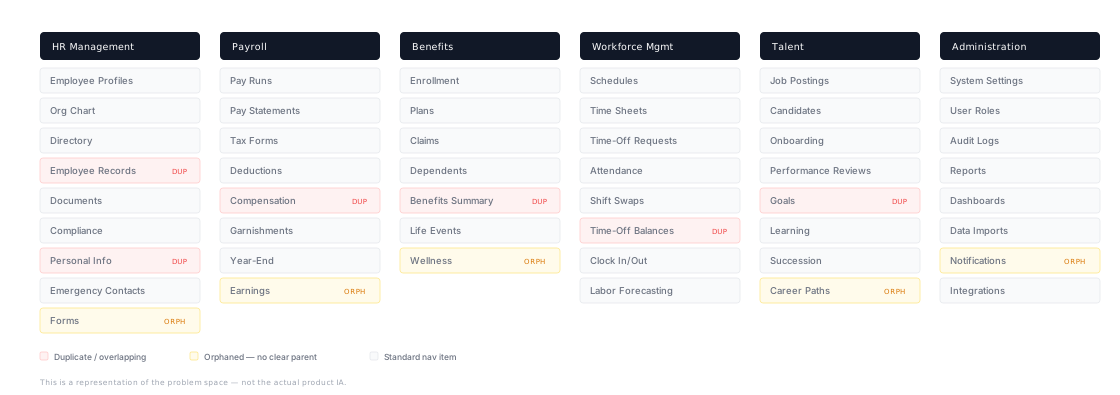
Navigation audit
Before designing anything, I audited the entire navigation surface. I mapped every top-level item, traced where features were duplicated across modules, and flagged orphaned items with no clear parent. The audit revealed three structural problems — duplicates, orphans, and org-chart mirroring — that no amount of visual polish could fix.
Click to enlarge
The Hard Decision
Why 6 districts?
The audit gave me a clear picture of the mess. The next question was: what's the right organizing principle? I explored three approaches and landed on districts — coherent domains that match how users think about their work.
✗ Option A
Mirror the org chart
Keep navigation aligned to engineering team ownership. Rejected — this was the source of the problem. Users don't know or care which team built a feature.
~ Option B
Role-based navigation
Show different nav for admins vs. employees vs. managers. Considered — but it fragments the product into parallel experiences and makes cross-role features hard to place.
✓ Option C
Task-based districts
Group by user intent — "I need to check my pay," "I need to request time off." Each district is a domain users can name and navigate to intuitively.
Design Principles
Group by user task
Not by product module or team ownership. "Time-Off" lives where employees look for it — not under WFM admin.
Every district is nameable
If a user can't describe a district in one word — People, Pay, Benefits, Time, Talent, Reports — it's too abstract.
New features have a home
The district model gives every future feature a defined place. No more nav entropy from teams adding items arbitrarily.
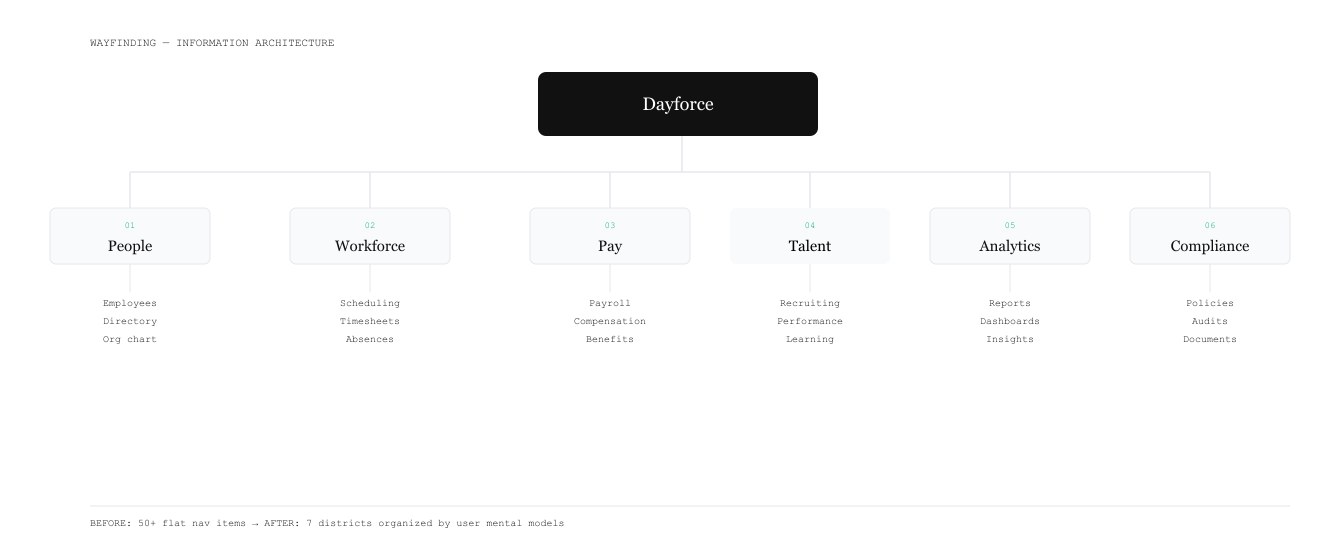
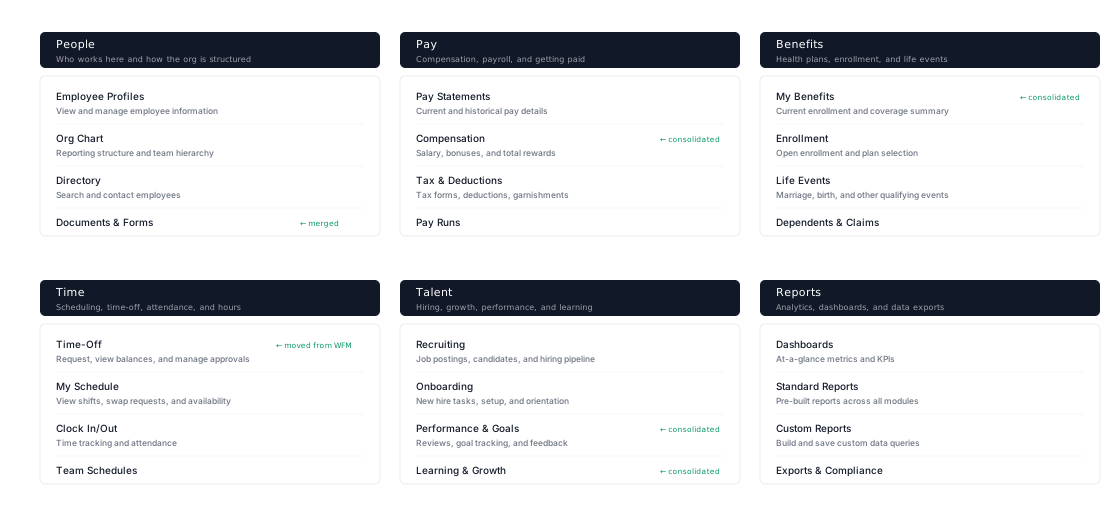
After
6 districts — organized by mental models
50+ scattered nav items consolidated into 6 coherent districts. Duplicates merged, orphans placed, and every item organized around how users think about their work — not how teams are structured internally.
Click to enlarge
Solution
Five components, one system
The districts defined the structure. The next challenge was building the navigation components that bring that structure to life — each solving a different wayfinding need.
01 Global Nav
Primary navigation
Streamlined to 6 "districts" organized by user mental models, not org structure. Each district is a coherent domain users recognize.
02 Feature Nav
Secondary navigation
Contextual nav within each district. Surfaced when relevant, hidden when not—reducing cognitive load without hiding functionality.
03 App Header
Global search
Cmd+K to search anything—pages, employees, reports, settings. A power user escape hatch that reduces nav dependency entirely.
04 Dashboard Template
Landing pages
Every Level 1 page gets a consistent dashboard. Users always land somewhere oriented, with quick actions and recent activity visible.
05 Omnibar
Page Level Wayfinding
Every page would have an Omnibar to ground the user on which page they're on, as well as displaying primary page-level actions they could take.
Impact
From lost to oriented
65%
Reduction in "where is..." support tickets
6
Districts instead of 50+ top-level nav items
10K+
Daily searches through App Header — users choosing speed over browsing
Consistency
A navigation template that scales—new teams adding features now have a defined place for everything rather than a blank nav to fill arbitrarily.
Scalability
The district model gives the product room to grow without nav entropy. Adding a new feature means choosing a district, not extending a flat list.
Reflection
What I learned
The hardest part wasn't the design — it was organizational alignment. 32 teams all had opinions about where their features should live in the hierarchy. The breakthrough: find the 80% that's genuinely common, make it undeniable through evidence, then give teams real control over the 20% that's legitimately different.
Shared research synthesis earlier — bringing researchers from different modules into the same room — would have accelerated alignment by months. Next time, I'd invest more in cross-team discovery before proposing any structure.
You can't mandate navigation from above. The districts succeeded because teams wanted to use them — the structure was intuitive enough that new features had an obvious home. That's the only kind of IA that holds at scale.