A Figma plugin that brings design system compliance into the workflow — not a doc page nobody reads.
Role
Lead Designer + Prototype
Stack
Figma Plugin API · Claude API · TypeScript
Status
Working prototype
The Problem
Documentation doesn't change behaviour
At Dayforce, the Everest Design System had thorough documentation — token guidelines, spacing rules, component usage specs. But violation rates didn't drop. Designers weren't ignoring the rules; they just weren't checking them until review.
The gap wasn't knowledge. It was proximity. The guidance lived in Notion. The work happened in Figma.
Insight
Guidance needs to be delivered where design decisions are made — inside the tool, at the moment of authoring — not on a page that requires a context switch.
Before
Designer finishes a frame. Ships to review. Reviewer catches hardcoded colors, wrong spacing, detached components. Designer goes back. Cycle repeats.
After
Designer selects a frame. Clicks Check. Gets specific, actionable feedback — with the right token category, the right spacing value — before the work leaves Figma.
How It Works
Three checks. One click.
CHECK 1 · COLOR TOKENS
Hardcoded colors surface immediately
The plugin reads every fill value on the selected layer. If a color isn't bound to a variable, it's flagged — with the hex value and the semantic token category it should map to: Interactive, Content, Borders, Surfaces, or Inactive.
CHECK 2 · SPACING SCALE
Off-scale values are called out by name
Everest uses an 8px base scale. The plugin checks every padding and gap value. 10px, 12px, 5.5px — all flagged as errors. 4px is allowed for micro-spacing, flagged as a warning with a suggestion to consider 8px for consistency.
CHECK 3 · COMPONENT INTEGRITY
Detached components don't slip through
Detached instances lose token bindings silently. The plugin detects them and flags as errors before they propagate through a design handoff.
In Action
Real feedback on a real Dayforce frame
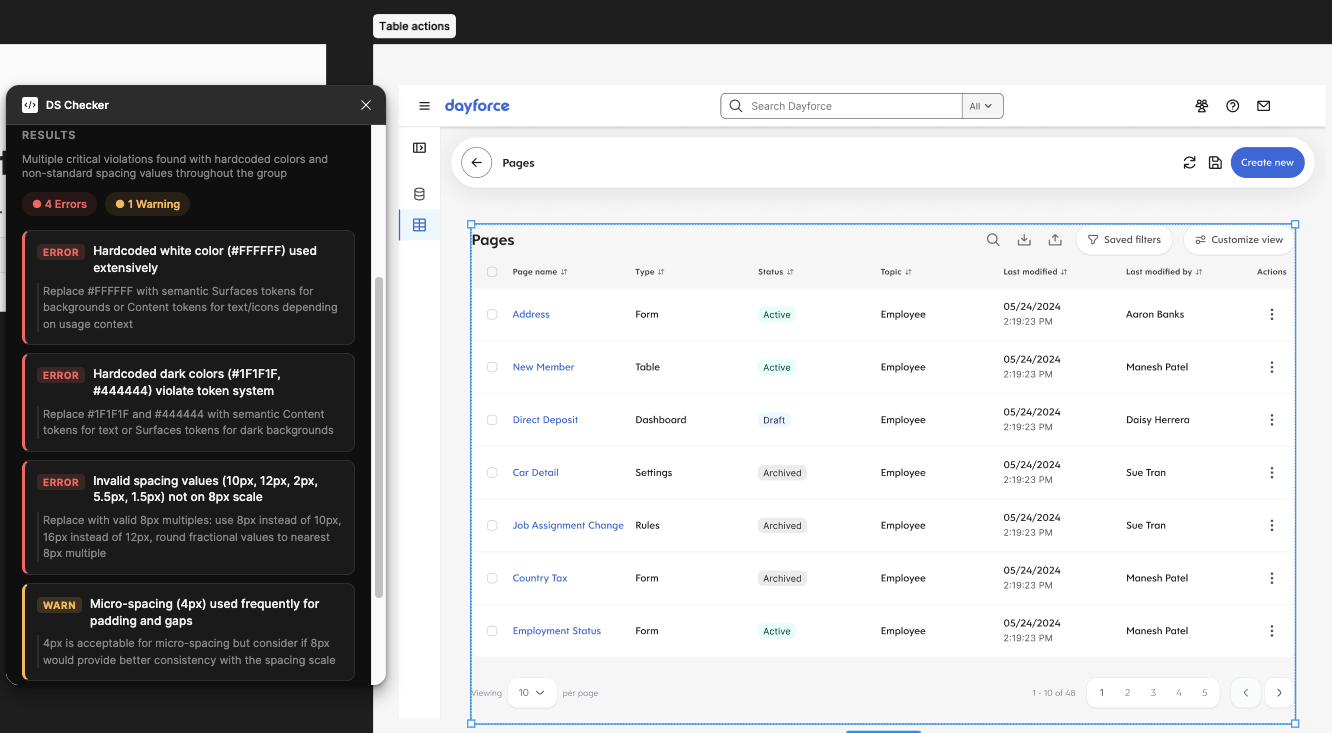
Selected a production table component from the Dayforce Pages screen. Four errors, one warning — caught before the frame reached review.
Click to enlarge
Error
Hardcoded white (#FFFFFF)
Replace with semantic Surfaces token for backgrounds, or Content token for text/icons depending on context.
Error
Hardcoded dark colors (#1F1F1F, #444444)
Replace with semantic Content tokens for text, or Surfaces tokens for dark backgrounds.
Error
Off-scale spacing (10px, 12px, 2px, 5.5px, 1.5px)
Replace with 8px scale values: use 8px instead of 10px, 16px instead of 12px.
Warning
4px micro-spacing used frequently
Acceptable for tight gaps, but consider 8px for padding-heavy containers for consistency.
Under the Hood
Two-layer architecture
Figma's plugin sandbox can't make network requests. The plugin splits into two parts — a sandboxed layer that reads node data, and a UI iframe that calls Claude.
Layer 1
code.ts
Runs in Figma sandbox. Reads fills, spacing, component bindings. Passes raw node data via postMessage.
Layer 2
ui.html
Runs in iframe. Receives node data, constructs prompt with Everest DS rules, calls Claude API, renders results.
Intelligence
Claude API
System prompt encodes Everest token categories, spacing scale, and component rules. Returns structured JSON with severity levels.
Production Path
What it would take to ship to a team
The prototype validates the concept. Scaling it to a design team of 30+ requires three things:
01 · Backend proxy
Move the Claude API key to a server. Designers authenticate via SSO — no keys, no setup friction.
02 · Living ruleset
Replace the hardcoded system prompt with a token file synced from the DS source of truth. Rules update when the system updates.
03 · Adoption telemetry
Log which violations are most common per team. Surface patterns that point to documentation gaps or missing components.
Reflection
The medium is the message
Design systems fail at adoption, not at design. The components can be excellent and still unused or misused — because compliance requires effort that competes with shipping. The only sustainable solution is to make the right choice the path of least resistance.
AI doesn't replace the DS designer here. It operationalizes the decisions already made — turning a static ruleset into a live, contextual check. The system becomes self-enforcing.